
Make your own little animated film, tonight
Claude can animate now, and ElevenLabs gives you voices that laugh and sigh. The complete tutorial, and the one role AI will never take: the director's.
New at Ergon: this issue can be read, watched and lived.
Don't feel like reading? Here's the video version: 5 minutes that cover almost everything below.
Or live it: a 2-minute story on your phone, where your choices change what happens next.
A real little animated film, in a single evening: do you think it's possible?
A quick word: this is the start of a new way of making the Brief, and this is the very first video. It isn't perfect, and it will get better with every issue. Your feedback will help a lot.
I have a confession to make.
For a few weeks now, I've been a film director.
Not in Hollywood. In my living room, at night, with a small crew that never sleeps.
You may have come across our little videos: Leo, a human at the end of his rope, his robot Ergon, far too sure of himself, and Claude, a very calm orange star.
I don't draw them. I don't animate them. I don't voice a single line.
Claude animates. ElevenLabs does the voices. And I do the director's job. I decide the story, I say what's wrong, and I ask for another take.
That's exactly what I'm inviting you to become tonight.
For a film made for your kids, a client or your team.
But be warned: most of our first attempts were bad. Not because of the tools. Because of one step I had skipped, and that almost everyone skips.
We'll get there.
What just changed
On October 8, Anthropic launched Claude Motion.
You describe an animation, you can attach images, data or a text, and Claude makes it.
You fix it by talking to it or directly in an editor, then you export it as a video (MP4).
The detail that changes everything: Claude doesn't make up random images, it writes the animation in code.
So if you don't like one word, you change that word, and nothing else moves. No more "regenerate and pray".
Two limits to know about:
- It's a beta for Team and Enterprise plans (Claude support). If you're on the free or Pro plan, I'll give you another way to do it below.
- There's no sound. That's where ElevenLabs comes in.
Your new crew
Think of it as a real film shoot.
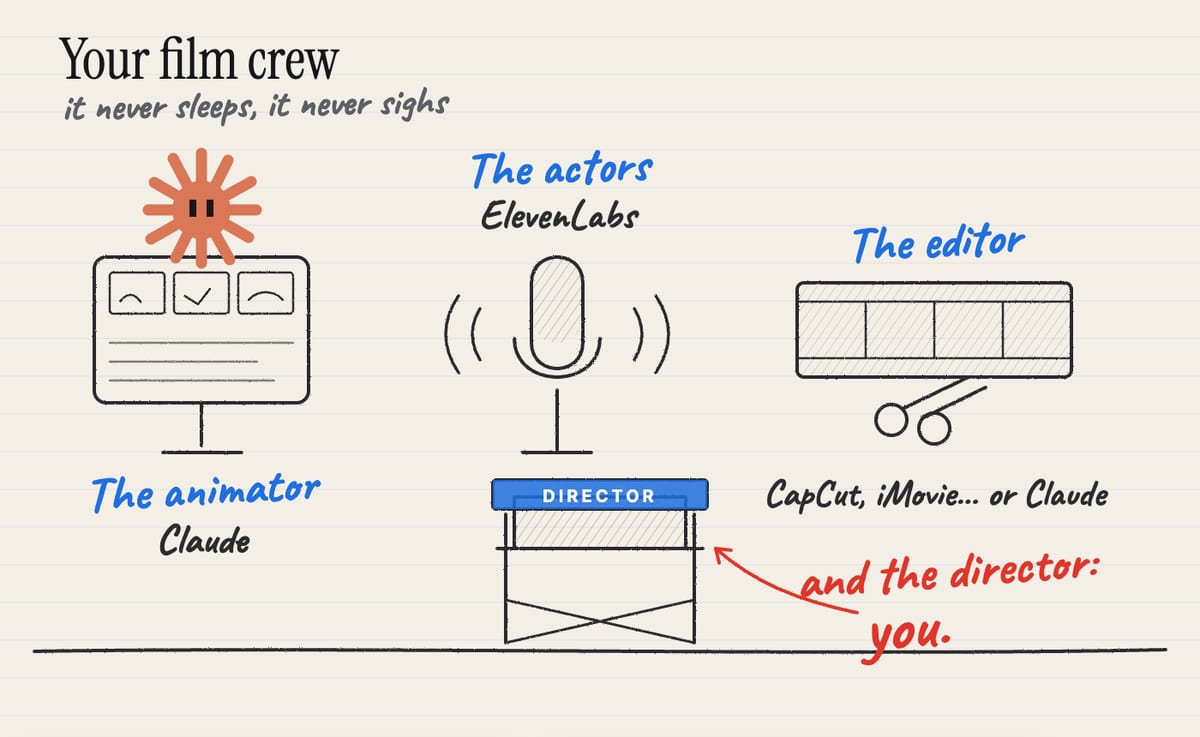
The animator is Claude. It draws, it animates, it redoes the scene as many times as you want, without ever sighing.
The actors are ElevenLabs. Voices that laugh, whisper and sigh on cue.
The editor is a free app that puts picture and sound together.
Or Claude, once again. I'll show you how below.
And someone is missing.
The director. That's you.
You'll notice Claude keeps coming back in this crew. That's on purpose.
My rule in this Brief: get the most out of one tool, rather than hand you five.
Switching tools at every step means five accounts, five subscriptions, five ways of working. And in the end, you master none of them.
Here, Claude does almost everything: it helps you find the story, it animates, and it can even edit. All it lacks is a voice, and for that, ElevenLabs is still the best in my view.
What about ChatGPT, you ask? As far as I know, it has nothing like Motion today. Gemini can generate short clips (a few seconds, with sound), often very beautiful, but you can't fine-tune them shot by shot the way you can a Claude animation.
The director's job
Here's the step I skipped at first.
What almost everyone does: "Claude, write me a cartoon script for my daughter."
And here's what you get: a brave little bunny who learns that friendship is the greatest treasure of all.
Clean, correct, and exactly the same as the one every other parent got by asking the same question.
The problem isn't AI. The problem is that we asked it to imagine for us.
An AI that imagines without you produces the average of everything it has read.
A good film starts with a picture in your head.
Not necessarily a full script. One picture.
Your daughter's teddy, scared of the dark when it's supposed to be the one protecting her.
Your client looking for your shop in the rain.
Your team on Monday morning, facing 400 emails.
That picture, AI can't have it. It doesn't know your daughter, your client or your Monday.
That's the director's job. And it's what makes the film touch someone.
Only then does Claude become extraordinary: it helps you turn that picture into a scene, find the rhythm, the punchline, the lines.
Use Claude to think with you, not to imagine for you.
If the picture won't come: the prompt to think with Claude
Sometimes you know what you want people to feel, without having the picture yet.
In that case, don't ask for a script. Ask Claude to help you find it, by asking you questions.
Copy this prompt, and replace what's in brackets:
I want to make a short animated film of [30 seconds]
for [my 5-year-old daughter].
At the end, I want her to feel [reassured before bed].

Don't write a script yet.
First, ask me questions, one at a time,
about the person who will watch: what she loves,
what makes her laugh, what worries her, her own words.
Then suggest three very different scenes,
two sentences each, with the opening image and the punchline.
That's the short version, and it already works very well.
Want the director's full prompt? The one I use for our videos: the questions, the three scenes, the script with emotions ready for ElevenLabs, the shots for Claude Motion, and the editing folder. Subscribe to the Brief (it's free) and reply SCRIPT to any of our emails: I'll send it to you.
You'll see: Claude's questions will make you find details you'd never have thought to give it.
You imagine. Claude helps you dig.
The shoot, in four steps
1. The script, with Claude
Start from your picture, or from the prompt above.
Aim for a single scene, two or three characters, and a punchline. Thirty seconds is already a lot.
One trick that changes everything: have every line written with its emotion.
"[worried, whispering] Did you hear that noise?" rather than "Did you hear that noise?".
You'll need it in the next step.
2. The voices, with ElevenLabs
On ElevenLabs, pick one voice per character, then paste each line.
The secret of our sketches is right there: emotions in brackets.
[laughs], [whispers], [sighs], [gasps]... The voice laughs, whispers, sighs, catches its breath.
The same text, said with a sigh in the right place, becomes a scene.
Two tips learned the hard way:
- One line per file. If a sentence sounds off, you only redo that one.
- Listen to everything again. Sometimes the voice repeats a word or adds one. It happens even with the best tools, and it sounds like a glitch.
3. The animation, with Claude Motion
In Claude, ask for an animation (or pick Motion in the outputs). Give it:
- your script with the lines and their length (the length of each audio file);
- what we should see on each line;
- the style: colors, shapes, mood ("night, rain on the window, warm light").
Speaking of style: it's your call. The same scene can become an ink sketchbook, a children's book, a retro video game or a little 3D figurine. You just have to ask.
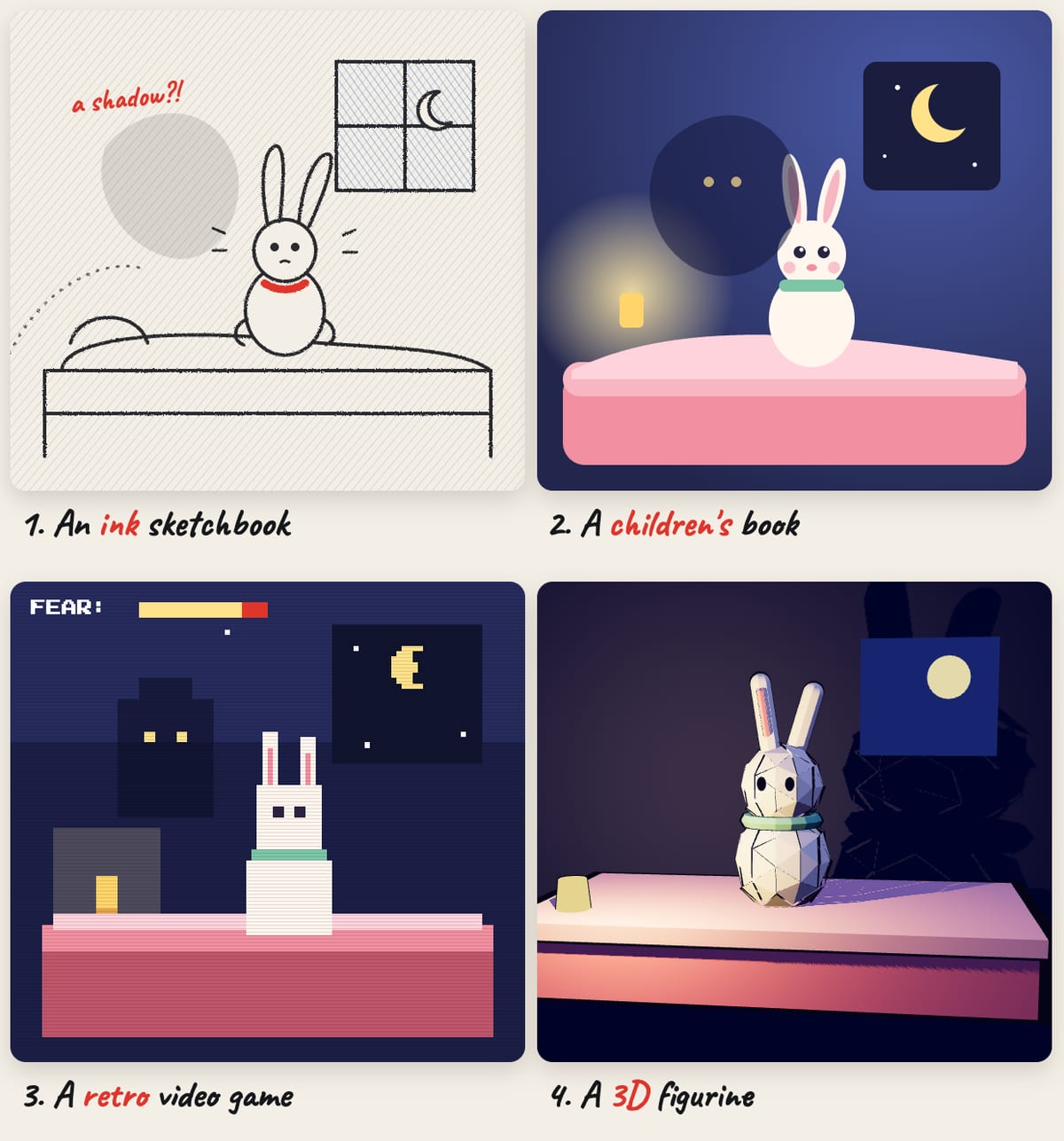
All four of these images were coded by Claude, from the same scene. Only the style I asked for changes.
Give notes the way a director talks to an animator: "The teddy needs to be smaller, and the moon only appears at the end."
Then export as MP4.
No Team or Enterprise plan? Ask Claude to create an animation for you in an artifact (an animated page it codes for you, available on every plan), play it full screen and record your screen.
It's a bit more hands-on, but the result can be superb.
4. Editing: an app, or Claude itself
All that's left is to bring picture and voices together.
You can do it in a simple app (CapCut, iMovie or Descript): drop in the video, lay the voices on top, add some soft music.
Or you can hand it to Claude.
Put everything in a well-organized folder: the exported animation, one voice file per line (named in order: 01, 02, 03...), the music, and your script.
Open the Claude app on your computer, give it access to that folder, and ask:
Edit this film: place each voice at the moment of its line
in the animation, add the music under the voices, low enough
that the dialogue is clear, and export the final video
into this folder.
That's exactly how Claude edits our videos of Leo, Ergon and Claude.
A good folder is half the edit. The tidier it is, the less Claude has to guess.
For this, Claude uses what was called Cowork until recently: its ability to work directly on the files on your computer and to run editing tools itself. It's for paid plans, and you need the Claude desktop app (Mac or Windows).
What I take away from all this
A year ago, making an animated film took a studio.
Today, it takes an evening.
But look at where the value is.
The animation, Claude does it. The voices, ElevenLabs does them.
What makes your daughter laugh or your client smile is the teddy scared of the dark. And that's you.
The easier the tools get, the more the director matters.
That's true for films. And it's true for pretty much everything AI can do.
See you soon,
Salim
The Ergon Brief
Get The Ergon Brief every week